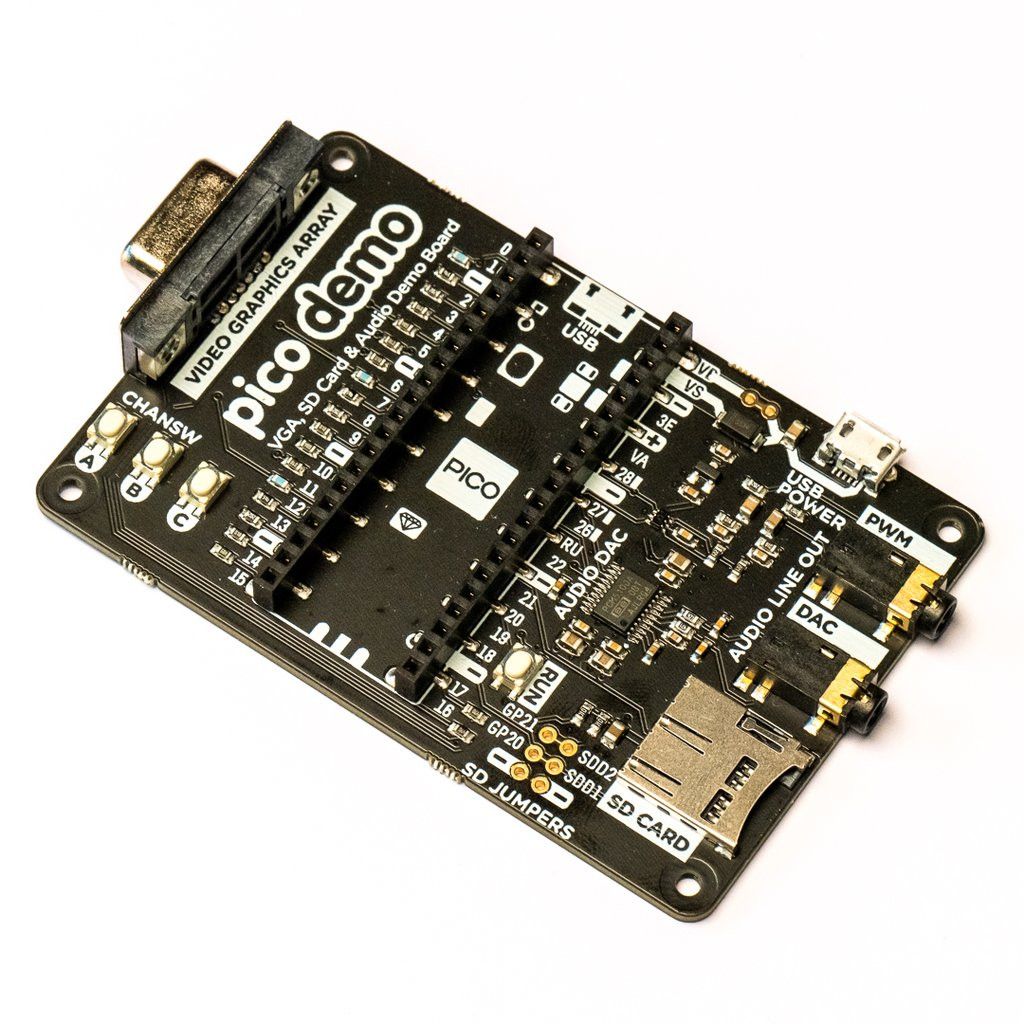
Built specifically to showcase the Raspberry Pi Pico’s affordable, feature-rich RP2040 chip, this board includes a VGA output, SD card slot, digital I2S audio output and much more!
Based on the Raspberry Pi reference design, our Pimoroni Pico VGA Demo Base is a great way to get started experimenting with the Raspberry Pi Pico/RP2040. It’s a perfect way to demonstrate some of the fun things you can achieve with the RP2040 microcontroller, such as producing a robust VGA output without taxing the processor at all!
- Impress your friends by showing them you still own a D-sub cable!
- Enjoy the glory of 15-bit analogue video!
- Bring tears to your eyes with warm, authentic, RC-filtered PWM audio!
This board runs a variety of video example programs that Raspberry Pi have collected to showcase the RP2040’s capabilities.
Note that the VGA Demo Base currently only works with the C/C++ Pico SDK!
Raspberry Pi Pico not included.
Your Pico must be soldered with male headers (pins down) so it can be connected to our add-on boards.
Features
- 15-pin VGA connector (D-sub)
- PCM5100A DAC for line-level audio via I2S (datasheet).
- PWM audio output
- SD card slot
- Reset button
- Female headers for mounting a Raspberry Pi Pico
- Three user-accessible switches
- Rubber feet
- Compatible with the Raspberry Pi Pico
- No soldering required (provided your Pico has headers fitted).
- Programmable in C/C++
Getting started
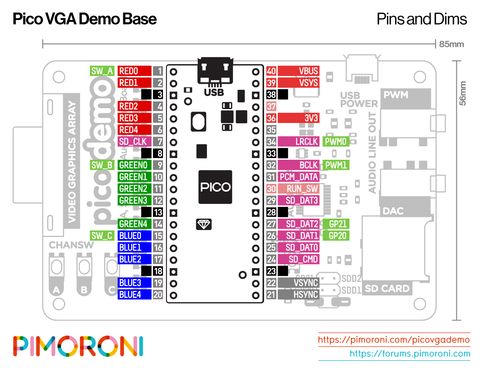
The pinout of our board is the same as the Raspberry Pi reference board; you can find it in chapter 3 of the Hardware Design with RP2040 document along with general information about the VGA breakout board.
If you want to run the audio and video examples in Raspberry Pi’s experimental repos, first ensure you have up-to-date versions of pico-extras and pico-playground. When building the examples you need to set the board configuration so the examples use the correct pins. You can do this by creating a new build directory and then specifying the board definition when running cmake:
cmake -D "PICO_BOARD=vgaboard" ...
More information on building applications with custom board configurations can be found in appendix D / page 267 of the C/C++ SDK documentation.